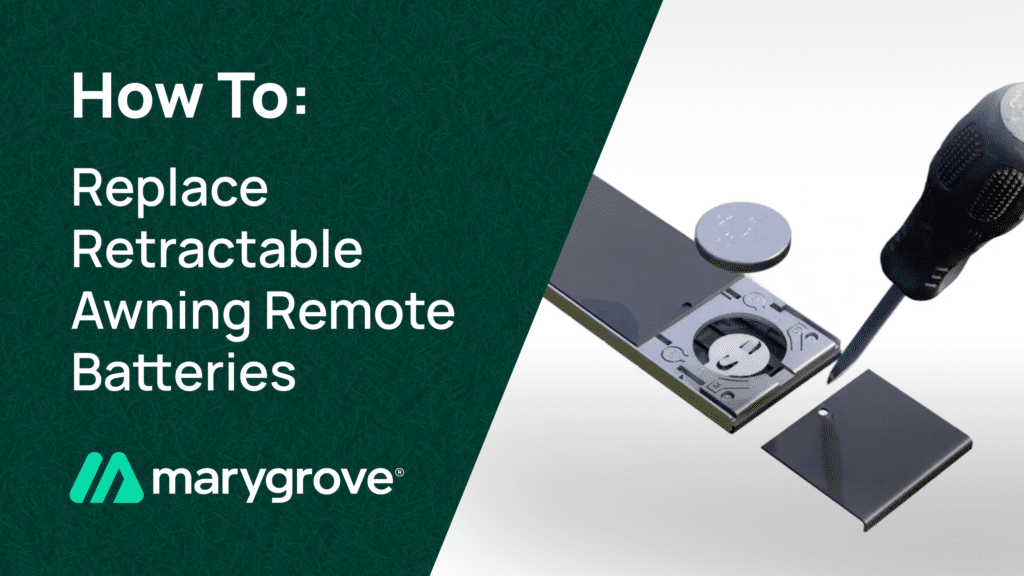
Your motorized awning is one of the most convenient features of your outdoor living space. With the press of a button, you can extend shade over your patio, deck, or windows without lifting a finger. But that convenience depends on a small yet essential component: the battery inside your awning remote. Like any battery-powered device, your remote will eventually need a fresh battery to keep working reliably. The good news is that replacing it is a quick and straightforward task that most homeowners can handle in just a few minutes.
Below, we walk you through everything you need to know, from recognizing the signs of a dying battery to replacing it and troubleshooting any issues that come up along the way.
Signs Your Awning Remote Battery Needs Replacing
A weak or dying battery rarely fails all at once. Instead, you will usually notice a gradual decline in performance. Here are the most common signs that it is time for a new battery:
- Reduced range: You used to be able to operate your awning from across the patio, but now you have to stand much closer to get a response. A shrinking operating range is one of the earliest indicators of a low battery.
- Intermittent response: You press the button and nothing happens, so you press it again and the awning moves. If your remote works only some of the time, the battery is likely struggling to send a consistent signal.
- Dimming or no LED indicator: Many awning remotes have a small LED light that flashes when you press a button. If that light appears dimmer than usual or does not light up at all, the battery is running low.
- Sluggish operation: If there is a noticeable delay between pressing the button and the awning responding, a weak signal from a low battery could be the cause.
If you notice any of these symptoms, do not wait until the remote stops working entirely. Replacing the battery now saves you the frustration of being unable to retract your awning when a sudden storm rolls in.
What Battery Does Your Awning Remote Use?
Motorized awning remotes use a variety of battery types depending on the manufacturer and model. The most common options include:
- CR2032 coin cell: This flat, round lithium battery is one of the most widely used batteries in compact awning remotes. It is inexpensive and available at virtually any grocery store, pharmacy, or hardware store.
- CR2430 or CR2450 coin cell: Slightly larger than the CR2032, these coin cells are found in some European-style remote controls and multi-channel transmitters.
- AAA batteries: Some larger handheld remotes, especially multi-channel units that control more than one awning or screen, use standard AAA batteries.
- 12V alkaline (A23 or MN21): A small cylindrical battery occasionally used in older remote models.
The easiest way to determine which battery your remote requires is to open the battery compartment and look at the existing battery. The type is printed directly on the battery itself. You can also check the user manual that came with your motorized awning system for the exact specification.
Step-by-Step: How to Replace Your Awning Remote Battery
Once you have the correct replacement battery in hand, the process takes just a minute or two.
Step 1: Identify Your Remote Type
Take a moment to look at your remote. Is it a slim, flat unit about the size of a credit card? A slightly thicker handheld device? Or a wall-mounted control panel? The style of your remote determines how the battery compartment opens. Slim remotes typically have a small slot or tab on the back, while larger handheld remotes may have a screw-secured cover or a sliding panel.
Step 2: Open the Battery Compartment
For most coin-cell remotes, you will find a small notch or groove along one edge of the back cover. Gently insert a fingernail, a small flathead screwdriver, or a coin into the notch and pry the cover open. If your remote uses AAA batteries, look for a sliding panel or a small Phillips-head screw holding the cover in place. Work carefully to avoid cracking the plastic housing.
Step 3: Remove the Old Battery
Before removing the old battery, take note of its orientation. For coin cells, observe which side faces up — the positive (+) side is usually visible. For AAA batteries, note the direction of the positive and negative terminals inside the compartment. Gently lift or slide the old battery out. If a coin cell is held in place by a small metal clip, press the clip slightly to release it.
Step 4: Insert the New Battery
Place the fresh battery into the compartment in the same orientation as the old one. The positive (+) side of a coin cell should typically face up, but always match what you observed in the previous step. For AAA batteries, align the positive and negative ends with the markings inside the compartment. Press the battery firmly into place until it sits flush and the retaining clip, if present, clicks over it.
Step 5: Test Your Remote
Snap or screw the battery cover back on, then point the remote at your awning and press the extend or retract button. The LED indicator should flash, and the awning should respond promptly. Try operating the awning from various distances around your patio to confirm that full range has been restored.
Troubleshooting: Remote Still Not Working After Battery Change
In most cases, popping in a new battery is all it takes. However, if your awning still is not responding, here are a few things to check before calling for help:
- Re-pair the remote with the motor: Some motorized awning systems require you to re-sync the remote after a battery change, especially if the old battery was completely dead for an extended period. The re-pairing process varies by manufacturer but usually involves pressing a small program button on the motor receiver and then pressing a button on the remote within a set time window. Consult your owner manual for the exact procedure, or watch our video on how to re-pair your awning remote.
- Check for obstructions: Make sure there is nothing blocking the signal path between your remote and the awning motor receiver. Large metal objects, thick walls, or electronic interference from nearby devices can weaken the signal.
- Inspect the battery contacts: Open the compartment again and look at the metal contacts inside. If you see corrosion — a white or greenish residue — gently clean the contacts with a cotton swab dipped in rubbing alcohol and let them dry before reinserting the battery.
- Verify the battery is not defective: Occasionally, a new battery straight from the package can be dead or near-dead, especially if it has been sitting on a store shelf for a long time. Try another fresh battery to rule this out.
If none of these steps resolve the issue, the problem may be with the remote itself or the awning motor receiver. At that point, it is best to schedule a service appointment with a professional who can diagnose the issue and get your awning back in working order.
Tips to Extend Your Awning Remote Battery Life
A few simple habits can help you get the longest possible life out of each battery:
- Store your remote indoors: Leaving your remote outside on a patio table exposes it to heat, humidity, and temperature swings that can drain the battery faster. Bring it inside when it is not in use.
- Avoid extreme temperatures: Both extreme heat and freezing cold reduce battery performance. Do not leave your remote in a car glove compartment during summer or in an unheated garage during winter.
- Keep it dry: Moisture can corrode the battery contacts and shorten battery life. If your remote gets wet, open the battery compartment and let it dry thoroughly before using it again.
- Use quality batteries: Name-brand batteries from reputable manufacturers tend to hold their charge longer and perform more consistently than bargain alternatives.
With proper care, most awning remote batteries last one to two years under normal use, so this is not a task you will need to do often.
Marygrove Is Here to Help
Changing your awning remote battery is one of the simplest maintenance tasks you can do to keep your outdoor space comfortable and convenient. But if you ever run into a situation that goes beyond a quick battery swap, remember that Marygrove Awnings has been helping homeowners since 1933. Every product we sell is backed by our industry-leading warranty, and our team is always just a phone call away. Whether you need troubleshooting help, replacement parts, or a brand-new awning for your home, we are here to make sure you get the most out of your outdoor living space.